
Infantry
Line infantry battalion visible in the Division Designer list.
Interactive player tool
Assemble line battalions and support companies from the units visible in the game interface. The builder saves a shareable roster without inventing hidden combat formulas or unverified slot rules.
Line battalions
Record counts; slot rules are not yet verified
Line infantry battalion visible in the Division Designer list.
Line anti-air battalion visible in the Division Designer list.
Line artillery battalion visible in the Division Designer list.
Line anti-tank battalion visible in the Division Designer list.
Motorized artillery appears in the line-unit selector.
Armored cars appear as a separate line-unit option.
Motorized infantry appears in the line-unit selector.
Support companies
Support anti-air is presented separately from line battalions.
Support artillery is presented separately from line battalions.
Support anti-tank is presented separately from line battalions.
Support option visible in both official Division Designer screenshots.
Support option visible in the Republic of China template screenshot.
Support option visible in the Republic of China template screenshot.
Support option visible in the Republic of China template screenshot.
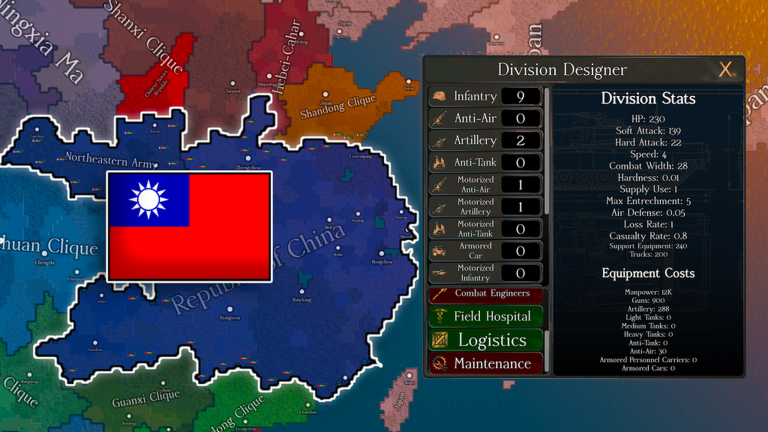
Observed reference
This is a static transcription of one screenshot, not a formula. Use it as a game-version reference when checking whether the live interface has changed.
FAQ
Not yet. Finest Hour does not publish its per-battalion formulas, and a single screenshot cannot establish them. The builder therefore records and shares the roster while keeping calculated fields out until they can be verified.
They were transcribed from Roblox-approved Finest Hour media, principally the two screenshots that show the in-game Division Designer.
Add the units you want, then use Copy share link. The selected roster is encoded in the URL, so another player can open the same composition.
Only clearly readable options are listed. The database will expand when additional current-version menus can be verified without guessing at labels or values.